Mechanical Keyboards: Switch Types and Layouts for Every Typist
Explore mechanical keyboard switch types, feel and sound, plus popular layouts—from 60% to full-size—to find the perfect fit for any typist.
Mechanical Appeal
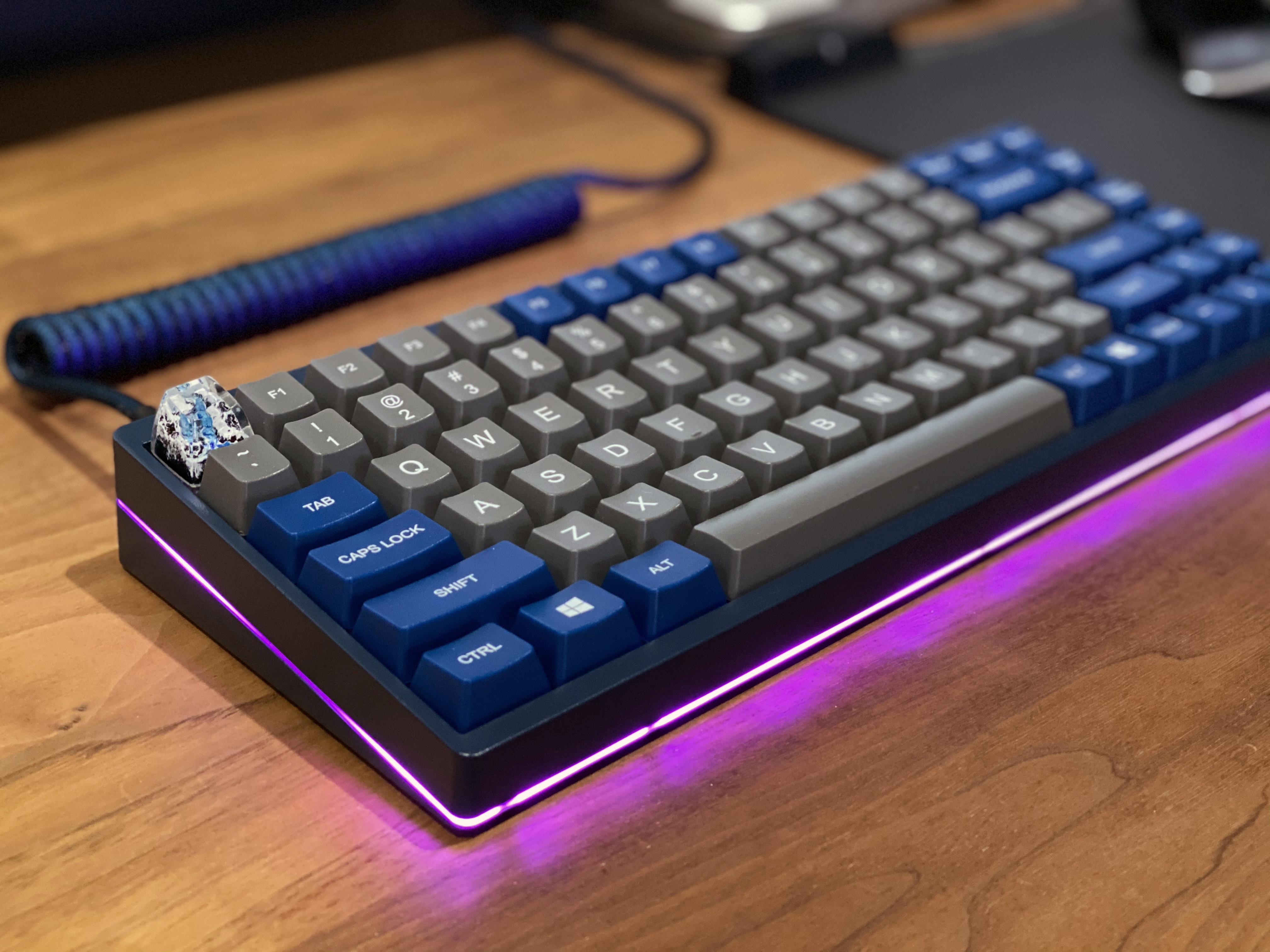
Mechanical keyboards stand out in the world of computers and consumer electronics because each key uses a discrete mechanical switch rather than a rubber dome. That means a consistent actuation point, defined travel distance, and a switchable spring weight that shape how every press feels. Inside each switch, a stem, spring, and housing work together to translate motion into input with precision. This design delivers durability, repairability, and a highly customizable experience. You can choose hot-swappable sockets to change switches without soldering, tailor keycap profiles for comfort, and select materials such as PBT for texture and wear resistance or ABS for smoothness and brighter legends. The keyboard body, from plate to PCB, influences sound and stability, while stabilizers keep larger keys like the spacebar level and quiet. For many, the draw is not only performance but also the ability to craft a unique typing feel and sound signature that fits personal taste and everyday workflows.
Switch Types Demystified
Mechanical switches generally fall into three families: linear, tactile, and clicky. Linear switches move straight down with no bump, offering smooth travel and predictable actuation favored for rapid inputs and gaming. Tactile switches add a noticeable bump at the actuation point, giving feedback that encourages deliberate keystrokes and reduces bottoming out. Clicky switches pair a tactile bump with an audible click for strong feedback, best suited to private spaces where sound is welcome. Consider actuation force and spring weight; lighter options reduce fatigue, while heavier springs help prevent accidental inputs. Details like pre-travel, total travel, and the force curve shape how the switch ramps up and bottoms out. You can also tune feel and sound with lubrication, switch films, and o-rings to damp impact. Proper stabilizers on larger keys, carefully tuned, further refine acoustics. Matching switch behavior to your typing style is the most impactful choice you will make.
Layouts and Sizes
Keyboard layout affects both productivity and desk space. A full-size board includes a function row, navigation cluster, and number pad for data entry and shortcuts. Tenkeyless (TKL) removes the numpad to free mouse space without sacrificing navigation keys. 75% condenses TKL into tighter spacing, while 65% keeps arrows and a few navigation keys in a compact frame. 60% drops arrows and many dedicated keys, relying on function layers for secondary actions. Ultra-compact 40% layouts demand heavy layering but offer remarkable portability. Regional standards such as ANSI and ISO influence key shapes and enter key placement, so pick what matches your habits. Some boards offer split spacebars, dedicated macro columns, or programmable layers to tailor shortcuts for coding, spreadsheets, and creative tools. Choosing the right layout means weighing direct-access keys against desk ergonomics, travel needs, and the efficiency of layered shortcuts.
Feel, Sound, and Comfort
A great board balances ergonomics and acoustics. For comfort, aim for neutral wrist angles, a light actuation force, and a height that avoids strain; a low-profile case or a wrist rest can help. Split or ergonomic designs enable shoulder-width typing and optional tenting to reduce ulnar deviation. Soundwise, materials and mounting matter. The plate material and case construction shape resonance, while gasket mounting, top mount, or tray mount each yield a different response and sound signature. Internal foams, switch films, and case dampening tame harsh tones, and desk mats further soften impact. Keycap thickness and profile influence pitch and perceived solidity, and properly tuned stabilizers prevent rattle on larger keys. If you share space, pick tactile or quiet linear switches, add o-rings or landing pads, and avoid clicky mechanisms. The result is a keyboard that sounds refined, feels consistent, and supports healthy, sustained typing sessions.
Buying and Customizing
Start by deciding between prebuilt convenience and custom flexibility. For easy experimentation, choose hot-swappable sockets to try different switch types without soldering. Look for programmable firmware such as QMK or VIA to remap keys, build layers, and assign macros. Performance-minded users may value NKRO for multiple simultaneous presses and responsive polling rate. Connectivity options include wired for consistent latency or wireless modes like Bluetooth or low-latency 2.4 GHz, with multi-device switching for productivity. Quality-of-life details matter: smooth stabilizers, robust case materials, and reliable keycaps with durable legends. Plan for maintenance by keeping keycap pullers, switch pullers, and soft brushes to remove dust, and consider occasional lubrication for smoother feel. When upgrading, explore PBT keycaps, alternative plate materials, or different mounting styles to refine acoustics. By aligning features, layout, and switch feel with your workflow, you can build a keyboard that elevates every keystroke.